
티스토리 뷰
git - Invalid username or token 문제 및 permission denied(The requested URL returned error: 403) 문제 해결하기
Kodong's blog 2025. 12. 17. 10:56mac에서 git을 설치하고, 코드를 올리려고 "git push origin master"를 했는데,
remote: Invalid username or token. Password authentication is not supported for Git operations. fatal: Authentication failed for 'https://github.com/kodong885/productManagementApplication.git/'
라는 에러 메시지가 떳다...
뭐, 에러메시지 그대로, username이나, token이 유효하지 않다는 의미이다.
근데, username은 바꾼적이 없을테니, 당연히 token문제이다.
즉, 토큰을 다시 생성해주면 된다.
https://datapilots.tistory.com/73
[Github] remote: Invalid username or password 에러 해결
에러 % git push origin master remote: Invalid username or password. fatal: Authentication failed for 'https://github.com/sin09135/TIL.git/' remote Error가 났다. 비밀번호 변경 사항이 없는데 Invalid username or password를 입력하라고
datapilots.tistory.com
이 브로그를 참고하여 토큰을 생성하고, 다시 연결해주면 된다.
⭐️ 참고로, 토큰을 생성할 때, 아래 personal token의 access를 정의해줘야한다. (그렇지않으면 에러난다.)
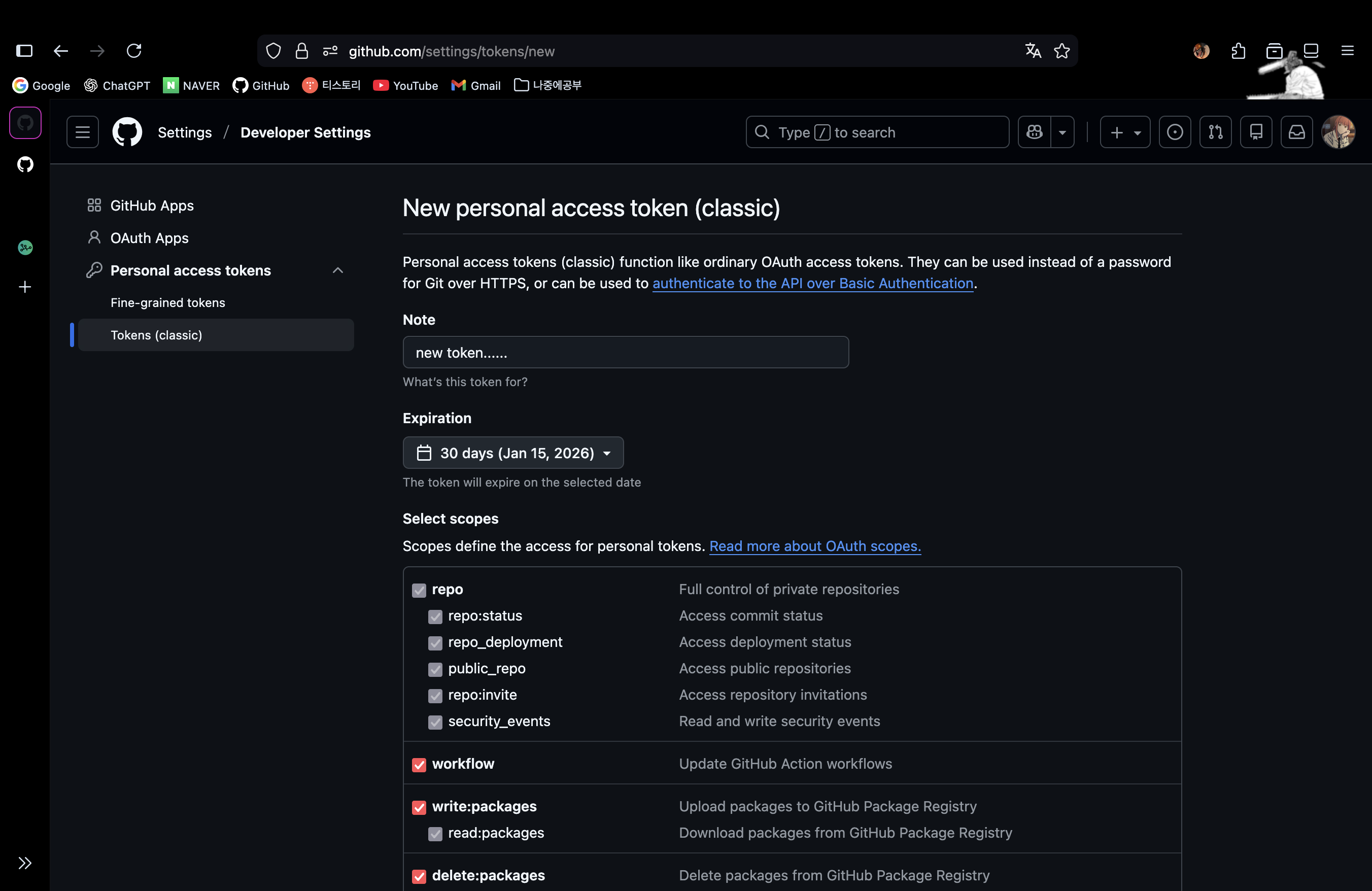
그렇게 하지 않으면, 아래와 같은 에러가 나타난다.
remote: Permission to kodong885/productManagementApplication.git denied to kodong885. fatal: unable to access 'https://github.com/kodong885/productManagementApplication.git/': The requested URL returned error: 403
즉, 403에러가 나타난다. 토큰에 repo에 대한 access를 주지않았으니, 당연히 서버에서 클라이언트가 접근 권한이 없다고 판단하여 발생시키는 에러인 403에러가 발생하는것이다.
또,
여기서 git token이 뭔지에 대해서 정리해보겠다.
Git Token : Personal access tokens are an alternative to using passwords for authentication to GitHub when using the GitHub API or the command line.
말그대로, github에 인증하기위해서 비밀번호 대신 사용되는 대안이다.
'git' 카테고리의 다른 글
| git - 없는 원격저장소를 연결한 프로젝트에 새 원격저장소 연결하기 (0) | 2025.09.02 |
|---|---|
| git - ! [rejected] master -> master (fetch first)error: failed to push some refs to < 레포지토리 주소 > 에러 해결하기 (3) | 2025.08.28 |
| git - " On branch master, nothing to commit, working tree clean " 메시지 해결하기 (5) | 2025.08.28 |
| 깃허브에 폴더 업로드하기(명령어 정리) (3) | 2025.07.27 |